1. Look at the statistics
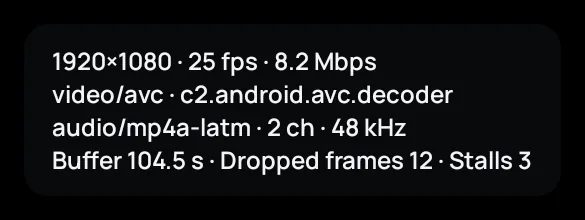
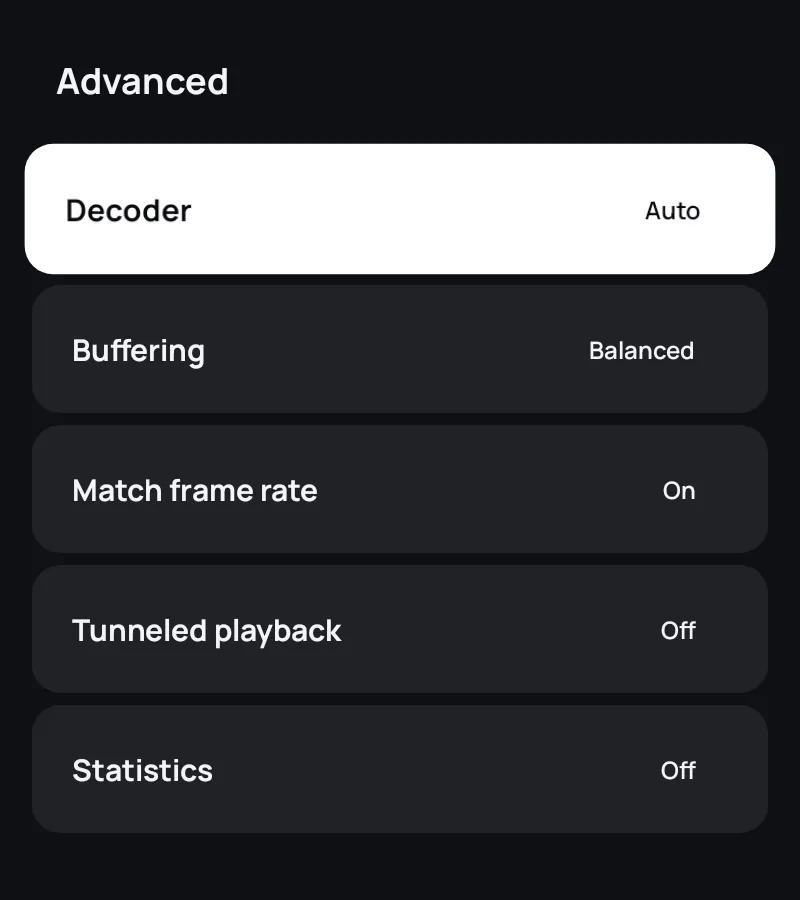
While something plays, open Settings › Advanced › Statistics. A small box shows the picture size, the decoder, how many seconds are buffered, the dropped frames and how often playback stalled.
- More stalls and little buffered: the connection is too slow (go on with 2 to 5).
- More dropped frames while plenty is buffered: the device can't decode the stream fast enough (go on with 6).
2. Check your speed
HD needs about 5–8 Mbps and 4K about 25 Mbps, for every device watching at the same time. Test the speed on the TV itself, not only on your phone.
3. Use a cable or a better Wi-Fi spot
A network cable to the TV or the box helps more than anything else. On Wi-Fi, use 5 GHz and keep the router close.
4. Choose a steadier buffer
In Settings › Advanced › Buffering, choose Stable: playback starts a moment later but rides out longer dips. Films and series already load far ahead by themselves.
5. Try another quality or copy
A lower quality needs less bandwidth, if the channel offers one. When a copy of a channel fails, Zapvo switches to another copy by itself.
6. Switch the decoder
If the picture stutters while plenty is buffered, set Decoder to Software (or back). Very new formats such as 4K HEVC can be too heavy for an older box.
7. Only some channels?
If the other channels play well, the problem is at the provider for those channels: tell them which ones and when.
8. Restart the device and the router
It sounds simple, but it clears a stuck connection or a tired TV box surprisingly often. Still stuck? Send us a message with your device and what the statistics show, but never your password or playlist link.